
Case study · Industry
Industrial Manager
The platform where the maintenance, production and quality teams of an industrial group log what happens on every shift: on the office computer, on the phone of whoever is on the line and in an iPhone app.
- Client
- Continuous-production industrial group with several plants
- Who uses it
- Maintenance, production, quality, control room and management
- We delivered
- Installable web app and iPhone app
- What we did
- Discovery, design, development, hosting and support


The challenge
The information existed, but it was scattered across Excel sheets.
The downtime log and the maintenance plan lived in separate Excel sheets, with causes typed by hand and different units from plant to plant. To know what was stopped, who was handling what and what it cost, someone had to phone around and do the maths separately.
- Breakdowns with no owner
- They were reported by word of mouth or by message, and it was not always clear who took them on and when they were fixed.
- Downtime hard to compare
- Each plant logged things its own way, so availability and lost production could not be compared.
- Preventive work far from the people doing it
- The plan sat in a file few people opened.
- Quality on the side
- Non-conformities and audits were not linked to the equipment or to the work done.
A day at the plant
From the alert on the line to the decision in the office.
People on the shop floor use their phones; the people who plan use the computer. The records are the same and stay linked: the breakdown, the downtime it caused, the work that fixed it and the parts it used.
-
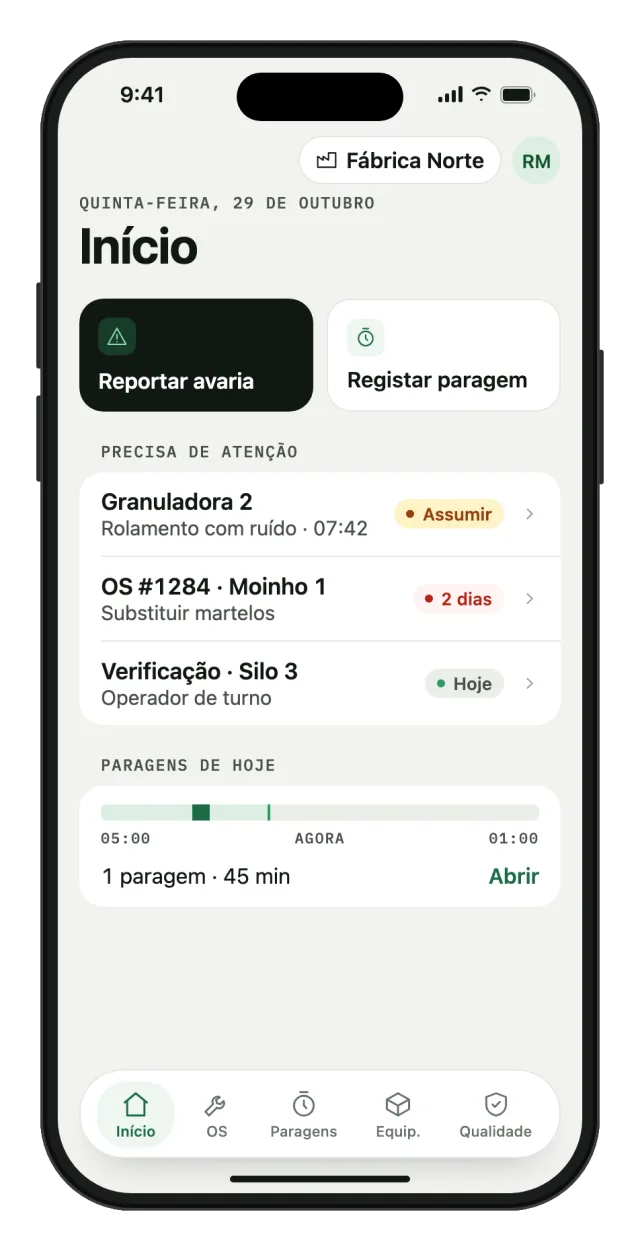
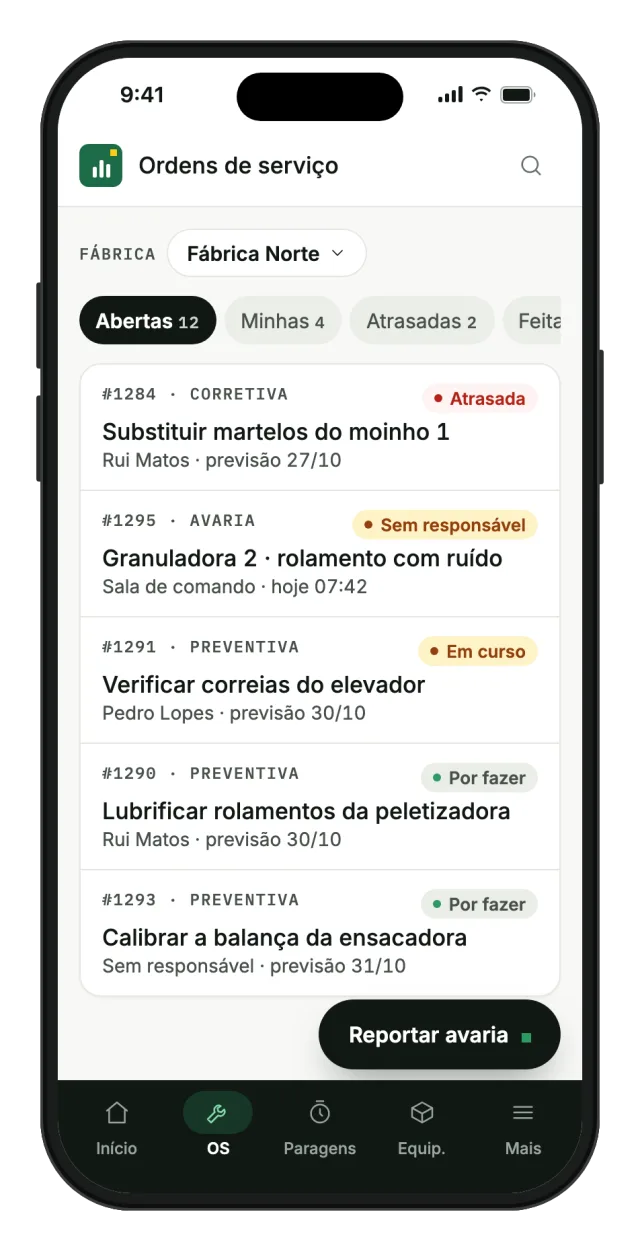
Someone on the line reports the breakdown
On the phone, right from the home screen. The breakdown shows up for the people who can take it, in the plants assigned to them.
- Sign-in by personal link, with no email or password
- Installs on the home screen, with no app store
- Shows clearly when there is no signal, so nobody thinks they saved
-
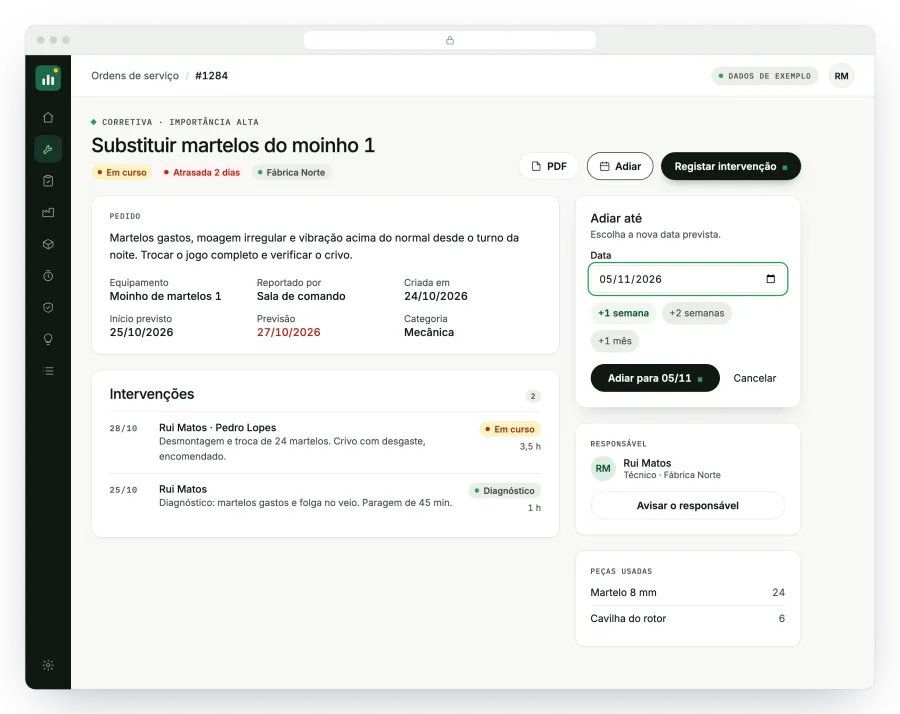
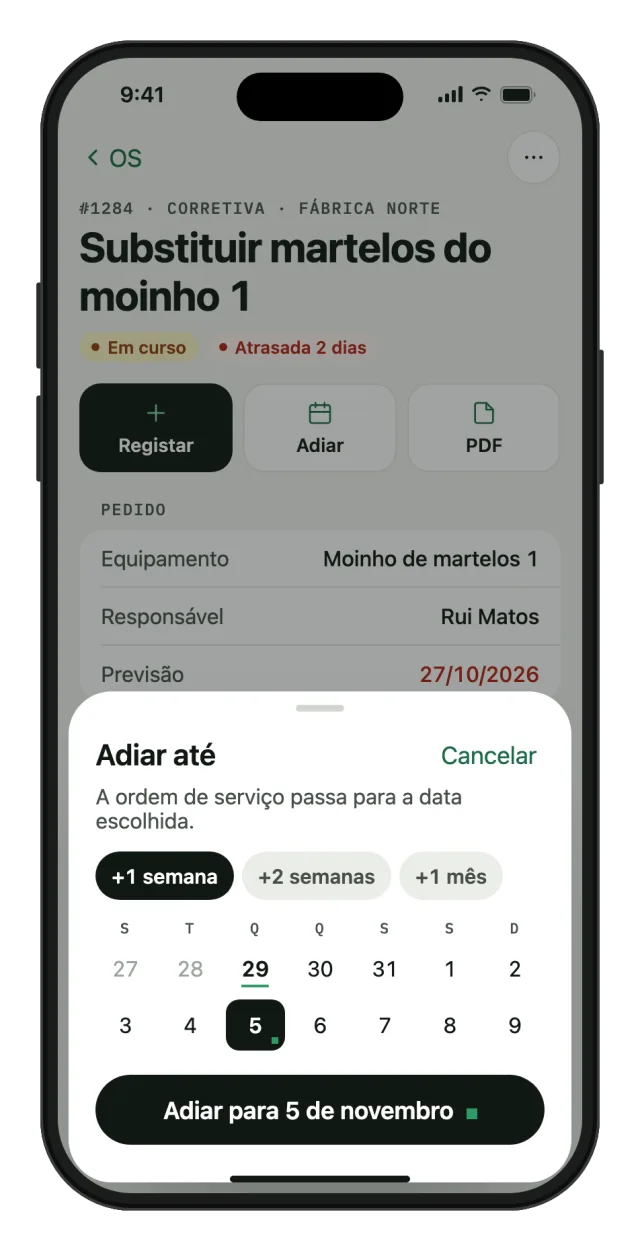
The technician takes it and fixes it
The work order holds the request, the work done, the owner and the parts used, which come off the stock. To postpone, just pick the new date.
- PDF of the order to send or print
- WhatsApp alert to the owner
- History of every job, with hours and team
-
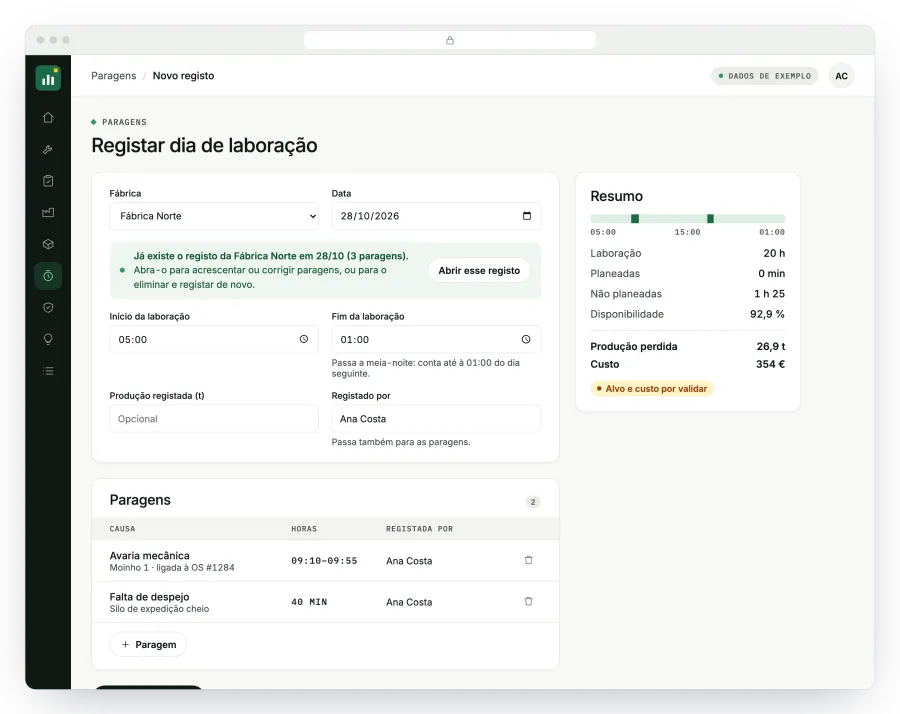
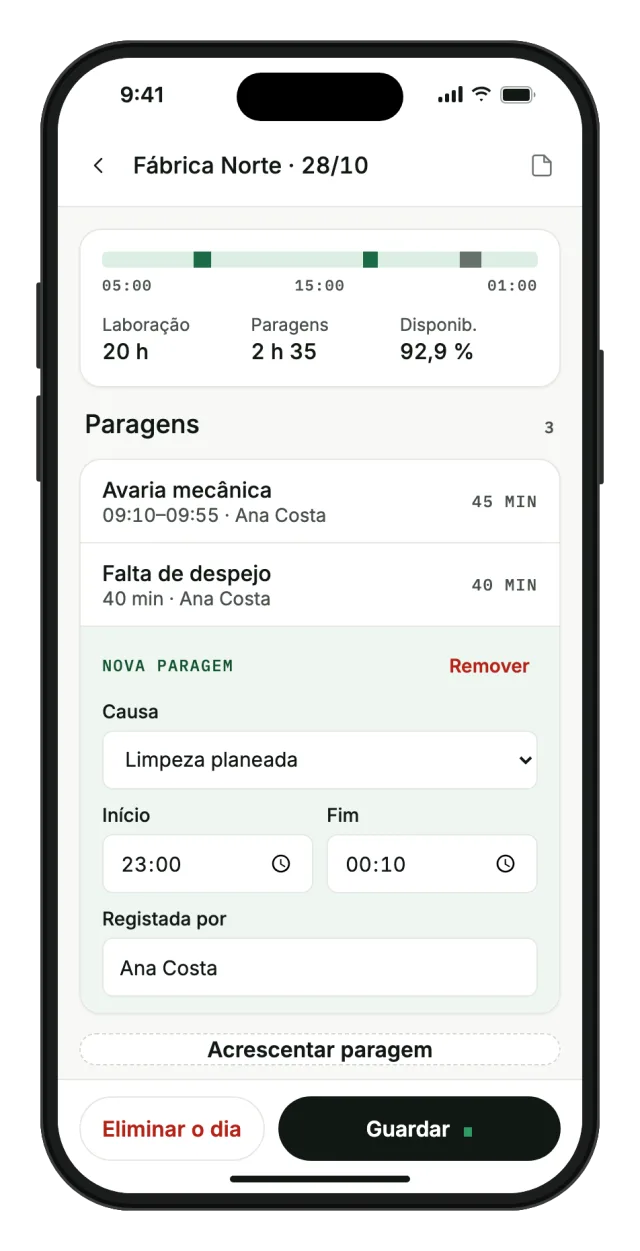
Each plant logs its day
The working day and the downtime, with causes from the official list. If that day already has a log, the app opens it instead of creating a duplicate.
- Planned and unplanned causes
- Who logged each stop, with corrections possible
- Availability, lost production and cost calculated on the spot
-
Management decides with everything in view
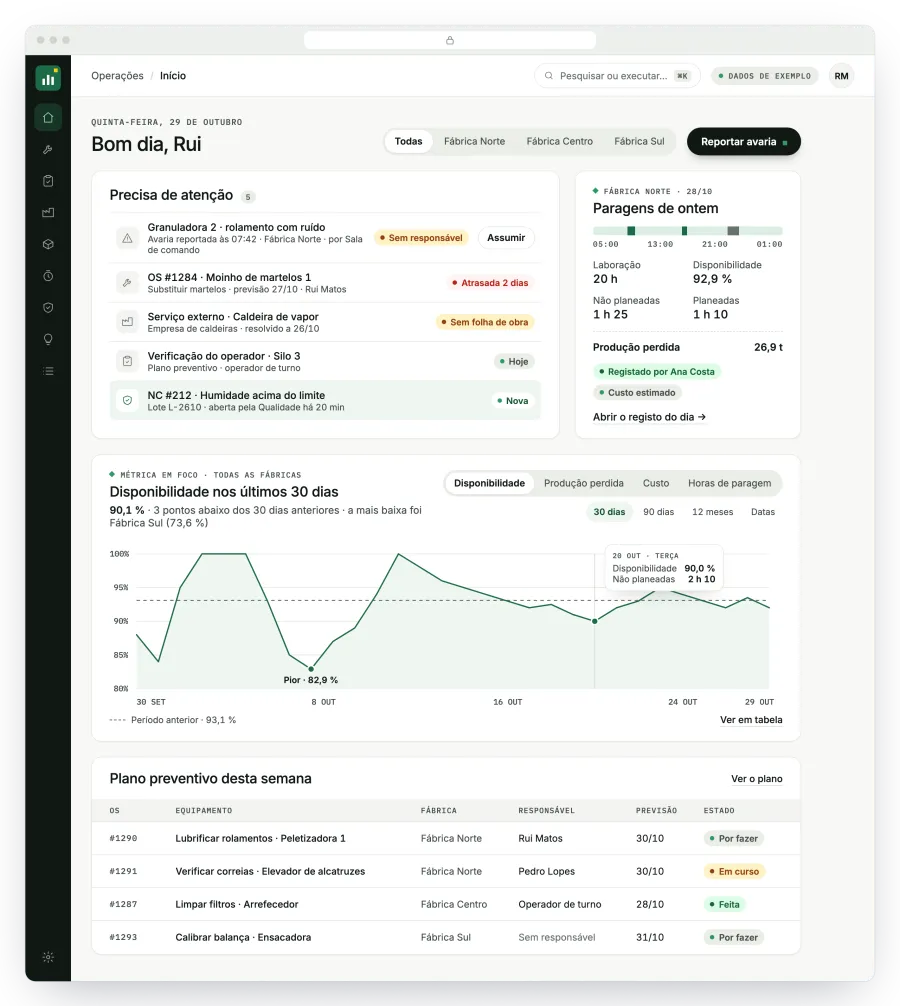
Home opens with what needs a decision: breakdowns with no owner, overdue orders and new non-conformities. Right below sit yesterday's downtime and the chosen metric, compared with the previous period.
- Plant filter at the top
- The week's preventive plan, with status and owner
- Export to Excel whenever the board needs it


Screens with sample data.
Also on the platform
The rest of what a plant needs, linked to the same data.
- Preventive plan
- The maintenance plan generates the week's work, and operators tick off their shift checks on the phone.
- Equipment and stock
- A record for each piece of equipment with criticality, manuals and parts with suppliers.
- Quality and improvement
- Non-conformities closed by Quality, audits and improvement ideas that go through approval.
- Sensors
- Each sensor has warning and alarm limits. An alarm opens a critical task, alerts the phone and, if nobody takes it in time, moves up to the next person in charge.
- External services
- Jobs by outside companies, with the technician, the scanned job sheet and the cost of the service.
- Production report
- The Excel file MultiDos sends by email is read every night and published on the management dashboard.
- Imported history
- The old Excel files were brought into the platform, with causes and units standardised.
- Action log
- Every save is logged with the name of whoever made it, including refused attempts.
AI assistant
The AI proposes, a person confirms.
The assistant turns dictated text into a job record, prepares the morning summary and answers questions about the plant's data.
It never saves on its own. It proposes the record, the person confirms, and saving goes through the same permissions and checks as any other record. The figures always come from the database.
Access
Everyone sees and does what is theirs to do.
Each person has a profile and the plants assigned to them. The rules are checked on the server, so they apply the same way on the web and on the iPhone.
- Administrator
- Sets up plants, teams, limits and permissions.
- Technician
- Logs and edits the work assigned to them.
- Quality
- Has a technician's access and closes non-conformities.
- Operator
- Reports breakdowns, logs downtime and ticks off shift checks.
- Control room
- A shared account that logs downtime under the name of whoever is on shift.
- Guest
- Views, without changing anything.
Technology
Simple to maintain and to grow.
- Web
- Node.js and MySQL, with a light interface that loads fast on modest phones and updates itself.
- iPhone
- Native SwiftUI app, distributed to the team and connected to the same server.
- Hosting
- A dedicated server with Docker and HTTPS, with backups before every update.
- Integrations
- Sensors and PLCs send readings over a dedicated connection, with one key per device. The MultiDos report comes in by email.
Result
Every breakdown has an owner and a date, downtime can be compared across plants and the preventive plan reaches the phone of whoever carries it out.